


Newv2.0.5 · Windows · macOS · iOS · Android

Your videos, findable in 170+ languages

YouClicker translates your titles, descriptions and subtitles into every language YouTube supports and writes them straight into Studio. No re-upload, no dubbing, no copy-pasting.

  • Download on the App Store
  • Get it on Google Play
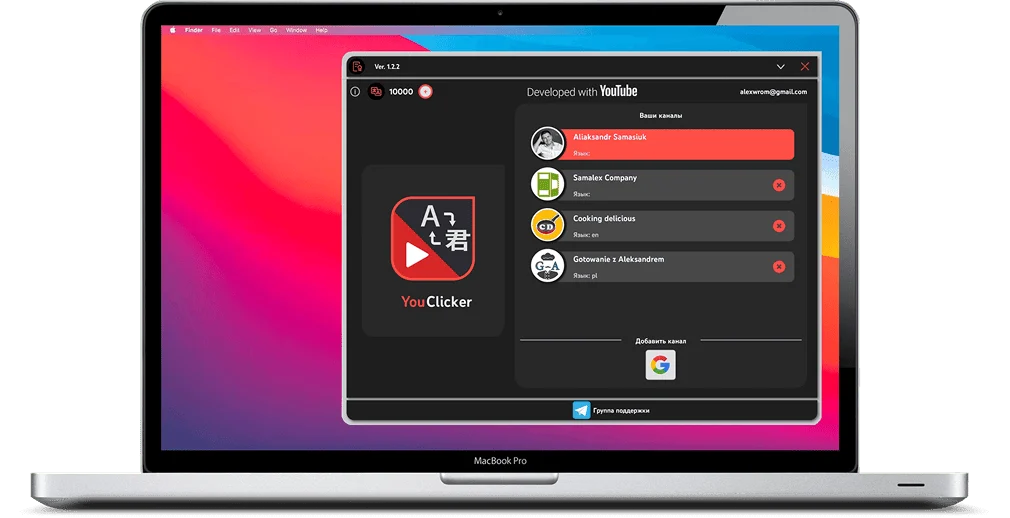
YouClicker desktop app: channel list and language selection

Languages YouTube supports

  • English
  • Español
  • Português
  • हिन्दी
  • العربية
  • Deutsch
  • Français
  • 日本語
  • Bahasa Indonesia
  • Türkçe
  • Русский
  • 한국어
  • Italiano
  • Polski
  • Tiếng Việt
  • ไทย
  • Nederlands
  • Українська
  • Svenska
  • Čeština
  • Română
  • Ελληνικά
  • עברית
  • 中文

What viewers see

They search in their language. Your title is in it.

One and the same upload, carrying a title, description and subtitles in every language YouTube supports.

|

How it works

Four steps, then it runs on its own

The longest part is choosing the languages.

  1. 01

    Install the app

    Windows, macOS, iOS or Android. Create a YouClicker account or sign in to an existing one.

  2. 02

    Connect your channel

    Authorize through Google's own consent screen and pick the video you want to localize.

  3. 03

    Choose target languages

    Pick from the full list YouTube supports: one language, twenty, or all of them.

  4. 04

    Let it write

    Titles, descriptions and subtitles land in YouTube Studio. A hundred languages takes about two minutes.

Advantages

Why bother localizing at all

The video is already made. What is missing is its title, description and subtitles in the languages you do not write in.

A real app, not a browser extension

YouClicker runs on your machine and talks to the YouTube Data API directly, so a batch of a hundred languages does not depend on a tab staying open.

  • Windows and macOS desktop apps
  • iOS and Android for publishing on the move
  • Several channels under one account
  • Download on the App Store
  • Get it on Google Play
YouClicker desktop app on macOS
  • Findable outside your own language

    A localized title is what makes your video eligible to appear for someone whose YouTube is not set to your language.

  • Two minutes, not a hundred forms

    Adding a hundred localizations by hand means a hundred passes through the Studio form. Here it is one run of about two minutes.

  • A different job from dubbing

    Subtitle tools translate a file. Dubbing tools redo the audio. YouClicker writes translated titles, descriptions and subtitles back into your own videos.

Pricing

Pay for points, not a subscription

One language of title and description costs 1 point. Subtitles in that language cost 1 more.

  • Basic

    €15

    3,000 points

    For trying it on a few videos

    Get points
  • Medium

    Most chosen

    €40

    10,000 points

    For a channel you localize every week

    Get points
  • Maximum

    €80

    22,000 points

    For working through a back catalogue

    Get points

How many points would you need?

Languages20
Videos10

400 points

The Basic pack covers it, €15

Prices are shown excluding VAT. Points are bought once and do not expire.

From creators

What people say after the first run

More reviews coming: we only publish ones we can attribute.

Sharing my own experience with the new translation app. We used a clicker before, but once auto-generated subtitles arrived it stopped working properly, so I tried this one. You add the channel once and pick the languages you want. After that every upload gets translated in about two minutes. Recommending it to save yourself the time. I think it even runs from a phone, though I have not tried that yet.

Healthy diet

YouTube channel

Security

What the app can and cannot do

YouClicker never sees your password and never touches the video file.

Developed with YouTube

The exact permissions are listed on Google's own consent screen before you approve anything.

What you grant

  • Read the list of videos on your channel
  • Write localized titles, descriptions and subtitle tracks
  • Read which languages YouTube accepts for a given video

What it never gets

  • Your Google password. Sign-in happens on Google's side
  • Your video files: nothing is uploaded, downloaded or deleted
  • Anything outside YouTube: no mail, contacts or files

Revoke access at any time in your Google Account → Security → Third-party apps.

From the blog

FAQ

Frequently asked questions

  • By hand it is YouTube Studio → Subtitles → Add language → Title and description, one language at a time. With YouClicker you connect the channel once through Google, pick a video and pick the languages, and the app writes every localization back to YouTube for you. Translating the same video again overwrites what was written before, and anything can be edited or removed by hand in Studio.

  • No. YouClicker translates text only: the title, the description and the subtitle track. It does not dub, re-voice or alter the audio in any way.

  • About two minutes for a single video across 100 languages.

  • More than 170: every language YouTube itself accepts for localized metadata. You can select any subset of them for a given video.

  • Neither. YouClicker is sold as one-time point packs: Basic €15 for 3,000 points, Medium €40 for 10,000, Maximum €80 for 22,000. Points do not expire.

  • One point per language for the title and description, plus one more if you also send subtitles in that language. A video pushed to 100 languages with subtitles is 200 points; without subtitles, 100. There is no average video: some channels localize into 20 languages, some into 150.

  • You authorize through Google's own OAuth consent screen, so YouClicker never sees your password. It stores an encrypted refresh token and your channel ID, requests only the scopes needed to write localizations, and access can be revoked from your Google account at any time.

  • Windows x64, macOS 12 and later, iOS and Android. One account, and points are shared across every device.

  • The OpenAI API, the Google Translate API and the DeepL API.

  • The new translations overwrite the previous ones. You can also edit or remove any of them by hand in YouTube Studio.

Ready to publish in every language?

Install YouClicker and localize your next upload in about two minutes.

  • Download on the App Store
  • Get it on Google Play